How to Get Boiler Out of Service Mode: Step-by-Step Guide
Learn how to safely exit boiler service mode with a clear, model-specific process. This Boiler Hub guide covers checks, safety, and troubleshooting to restore normal boiler operation for homeowners and facility managers.


Exit boiler service mode by following a model-specific sequence. Before you begin, have the owner's manual handy and a safe shut-off option. This guide from Boiler Hub covers safe checks, a clear step-by-step procedure, and troubleshooting to restore normal boiler control. If codes appear or the system remains locked, stop and contact a professional.
What service mode on a boiler means
Service mode on a boiler is a deliberate maintenance state that prevents normal automatic operation while technicians service or inspect the system. According to Boiler Hub, entering service mode stops the boiler from firing during regular demand cycles, reduces the risk of accidental ignition, and can lock out certain features until it is reset to normal operation. This mode is highly model-dependent: some units display a dedicated service icon, others show “Service” on the control screen, and a few require a physical switch behind the front panel. It’s important to note that service mode is not the same as simply turning the boiler off or into standby—it's an intentional state that should be reversed once service tasks are complete. If your boiler recently underwent maintenance, you may encounter an automatic re-entry into service mode via a timer or a fault-clearing routine; consult the manual to adjust or disable such timers safely.
Understanding your model’s service mode behavior helps prevent confusion and reduces the risk of improper re-entry during normal operation. Keep the owner’s manual handy and consider keeping a quick-reference note near the boiler so future maintenance can proceed smoothly. Boiler Hub’s guidance emphasizes model-specific steps and safety rituals to help you regain normal operation without compromising safety.
Safety first: before exiting service mode
Safety is the foundation of any service-mode reset. Before attempting to exit, ensure the area around the boiler is clear of combustibles and that you have a clear escape route in case of a gas smell or fire-like condition. Shut off electrical power to the boiler using either the dedicated switch on the unit or the main breaker if accessible. If you smell gas, hear a hiss, or notice a strong odor, evacuate the area immediately and call your gas utility or emergency services. Wear appropriate PPE—gloves and eye protection—when handling panels or exposed components, and avoid touching electrical connections with wet hands.
Verify that the boiler pressure and water temperature are within safe ranges according to the manual. If your system uses a condensate trap or secondary heating circuit, inspect for obvious signs of blockage or leakage. Do not attempt to bypass safety interlocks or ignore fault indicators, as doing so can create dangerous conditions or cause damage that requires professional repair. After powering down, wait at least 60 seconds to allow capacitors to discharge and to ensure safe handling of controls.
How to approach the exit: overview of steps
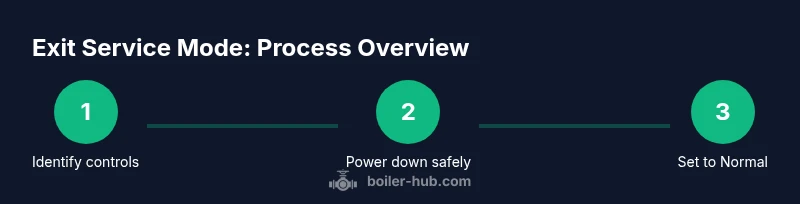
Exiting service mode is a controlled process that typically involves: locating the service mode control, switching it to Normal or Run, rebooting the boiler, and validating that the system returns to standard operation. Different boilers use different interfaces: some rely on a digital touch panel with a menu option for Service/Normal, others use a physical panel switch, and some require specific button combinations. The common thread is that you must follow the model-specific sequence outlined in the user manual. Think of this as a reset to factory-like normal operation, followed by a test run to confirm heating and hot water functions.
As you progress, take notes or photos of any settings before you modify them. This makes it easier to revert if needed. If any step feels uncertain, pause and consult the manual or contact a professional. The goal is to restore reliable operation while maintaining all built-in safety protections.
Boiler variations: gas, oil, and combi differences
Gas boilers, oil boilers, and combi (combination) boilers each have unique service-mode interfaces and protections. Gas units may show a service icon on a digital display, while older gas models rely on a manual switch. Oil-fired models often integrate a fused control panel behind the service door, with a service-mode toggle accessible only after opening the panel. Combi boilers combine space heating and domestic hot water controls in one unit, so exiting service mode may affect both heating and hot-water routines. Regardless of type, always refer to the specific boiler’s manual for the exact sequence. If the model uses a remote control or smart thermostat integration, ensure those devices aren’t forcing a service-mode state after your manual reset.
When in doubt, contact the manufacturer’s support line for model-specific instructions. Boiler Hub encourages homeowners to keep a current copy of the manual and to be aware of any model-specific quirks, such as timer-based re-entry or safety interlocks that require a reset after a fault.
Troubleshooting if service mode won’t exit
If your boiler refuses to exit service mode, re-check the exact steps in the manual because sequences vary widely. Confirm that you completed every required action, including any confirmation prompts on a display or a sequence of button presses. Power down again, wait 60 seconds, and retry with caution, watching for error codes or flashing indicators. If the system still sits in service mode or displays fault codes, do not force operation. Some codes indicate issues with flame sensing, ignition, or safety interlocks that require professional service. In such cases, record any fault codes, take photos of the display, and schedule a service call with a qualified technician.
Remember that persistent service-mode states can mask underlying problems. It’s better to pause and call a professional if you’re unsure or if fault indicators appear after attempting to exit.
Maintenance tips to prevent accidental re-entry
Proactive maintenance reduces the chance of unwanted re-entry into service mode. Schedule annual boiler servicing by a qualified technician and keep the service log handy. Make sure timers that control service mode are documented and understood, so you can disable them if appropriate. Keep the area around the boiler clear and inspect for signs of water leaks, corrosion, or soot buildup. Regularly test the boiler’s safety features by running the heating cycle from a thermostat or timer to confirm normal operation. Finally, maintain a copy of the manufacturer’s manual as well as any model-specific safety instructions in a known location. Regular maintenance helps prevent surprises and keeps your boiler operating safely and efficiently.
AUTHORITY SOURCES
For safety and code guidance, refer to reputable sources:
- https://www energy.gov/eere/buildings/articles/boilers-systems
- https://www.osha.gov/boilers
- https://www.nist.gov/
These sources provide foundational guidance on boiler safety, maintenance practices, and general electrical/safety precautions that complement model-specific instructions.
Tools & Materials
- Owner's manual(Locate the exact service mode instructions for your boiler model.)
- Screwdriver set (flathead and Phillips)(To remove panels or access service controls.)
- Digital multimeter (optional)(Use only if you’re comfortable checking electrical circuits.)
- Flashlight(Inspect panels and labels in low light areas.)
- Gloves and eye protection(Wear PPE when handling exposed components.)
- Notebook and pen(Document settings and steps for future reference.)
- Camera or smartphone(Capture pre/post-change visuals for records.)
Steps
Estimated time: 30-40 minutes
- 1
Identify model and locate service controls
Start by locating your boiler’s model number and the section of the manual that describes service mode. Find the service toggle, panel switch, or menu option labeled Service, Maintenance, or Normal operation. If you can’t locate the controls, stop and consult the manual or a professional to avoid missteps.
Tip: Take a photo of the control panel layout before changing anything. - 2
Power down the boiler safely
Turn off power to the boiler at the dedicated switch or main breaker. If you can access the service panel without touching live wiring, do so, but never work on energized components. Wait 60 seconds after powering down to discharge capacitors.
Tip: Always verify the switch/ breaker is in OFF position before touching any components. - 3
Access the service mode control and set to Normal/Run
Using the manual’s instructions, access the service mode control and switch it to Normal or Run. Some units require a confirmation step; complete it as directed. If no clear option exists, follow the manual’s exact sequence for exiting service mode.
Tip: If your unit uses a keypad, you may need to press a sequence like Service → Exit → Confirm. - 4
Power up and initiate a boot cycle
Restore power to the boiler and observe the startup sequence. Listen for ignition, check that flame sense is stable, and watch for normal status indicators. Do not interfere with the unit during ignition or cycling.
Tip: Do not touch the thermostat or gas valve during ignition; let the system complete its boot cycle. - 5
Verify operation and clear any fault codes
After boot, check that the display shows Normal or Run and that there are no error codes. If codes appear, refer to the manual’s fault section and perform any recommended resets. If a fault persists, call a technician.
Tip: Record any codes and screen details before contacting support. - 6
Test heating and domestic hot water
Set the thermostat for heating and run a hot-water cycle if applicable. Confirm the boiler fires, heats water, and maintains stable pressure and temperature without repeating service-mode prompts.
Tip: Monitor for abnormal noises, gas odors, or leaks during the test run. - 7
Finalize and monitor
Document the final status, return the room to normal operation, and monitor the system for 24 hours. If anything feels off, revert to the manual and schedule a professional inspection.
Tip: Keep notes handy for future servicing and ensure the logs reflect the exit from service mode.
Questions & Answers
What does 'service mode' on a boiler do?
Service mode is a maintenance state that prevents normal operation while technicians service the boiler. It disables automatic ignition and normal firing until the mode is exited.
Service mode is a maintenance state that stops normal operation until you exit it with the right steps.
Can I exit service mode myself or should I call a professional?
In many cases you can exit service mode by following the model-specific steps in the owner’s manual. If you’re unsure or fault codes appear, contact a professional.
You can usually exit yourself if you follow the manual, but call a pro if codes show or you’re unsure.
What should I do if the boiler won't exit service mode?
Double-check the manual for the exact sequence; reset power and retry. If it remains locked or shows fault codes, schedule a technician visit.
If it won’t exit, verify the exact steps in the manual and consider professional help.
Are there safety risks when exiting service mode?
Yes. Exiting service mode with active faults or bypassing safety checks can cause dangerous conditions or hidden issues. Follow the safety interlocks and stop if uncertain.
Exiting can be risky if faults exist; don’t bypass safety checks.
How can I prevent accidental re-entry into service mode?
Keep a current maintenance plan, note timers that trigger service mode, and store model-specific instructions in a accessible place.
Keep service instructions handy and document reminders to avoid accidental re-entry.
Watch Video
Key Points
- Always prioritize safety before attempting to exit service mode
- Follow model-specific steps from the manual
- Power down before touching controls
- Verify normal operation after exit and monitor for faults
- Call a professional if unsure or fault codes persist